This is Part 2 of a two-part series on email authentication. Part 1: Why Messages That Fail SPF, DKIM, or DMARC Still Reach Inboxes — and How to Fix It in MDaemon.
If you’ve read my previous post on why failing authentication doesn’t always block mail, you already know the asymmetry at the heart of DMARC: you control how your server treats other people’s authentication failures, but other servers decide how to treat yours. And what they do depends almost entirely on the DMARC policy you publish.
The default starting point, and the policy a huge percentage of domains never move past, is p=none. It’s the safe, observational mode. It tells the world: I’m watching, but please don’t reject or quarantine anything on my account. It’s meant to be temporary, yet many administrators either forget or simply refuse to move past it.
This post is about the journey from p=none to p=reject: what it actually protects you from, how to get there in stages, and how to avoid the problems that scare most administrators into staying at p=none forever.
For reference, a complete DMARC record looks like this - p= is just one of several tags it contains:
v=DMARC1; p=reject; rua=mailto:dmarc-rua@yourcompany.com;
ruf=mailto:dmarc-ruf@yourcompany.com; fo=1;
adkim=r; aspf=r; pct=100; sp=reject
Why move past p=none at all?
At p=none, the policy itself doesn’t enforce anything; it is primarily used for reporting. Receivers send aggregate XML reports to the address in your rua= tag, and forensic per-message reports to your ruf= tag, but only if those tags are actually published in your DMARC record. In practice, most major receivers (Gmail included) no longer send forensic reports due to privacy concerns, so aggregate reports are what you’ll be working with. With those flowing, you can see who’s sending mail claiming to be your domain. That’s valuable for visibility, but it doesn’t actually protect anyone.
Here’s what an aggregate report looks like in a parsed view:
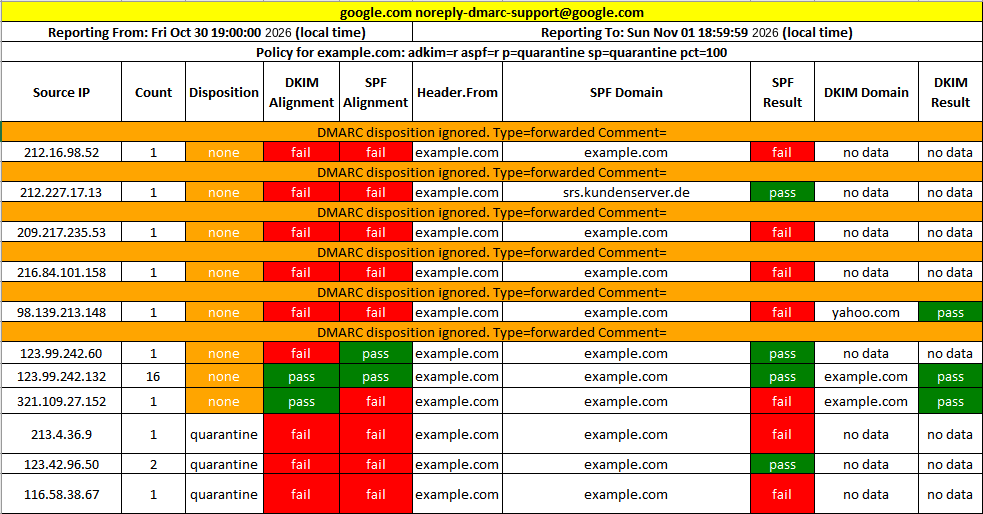
A domain at p=none provides no protection against direct-domain spoofing. An attacker sending mail from ceo@yourcompany.com to your customers, partners, and employees will land in inboxes exactly as if your DMARC record didn’t exist (unless it gets filtered out by other processes such as SMTP callback verification). By default, the receiving server checks your record, sees p=none, logs the failure, and delivers the message.
Moving to p=quarantine tells the world to send failures to spam. Moving to p=reject tells the world to refuse them at the SMTP transaction. Both of those will block direct-domain spoofing at receivers that honor DMARC, which is essentially every major provider. Neither one is dangerous if you do the prep work first.
Prerequisites before you make any changes to your DMARC record
Do not skip this section. The way mail breaks during a DMARC tightening is almost always because something on this list was missed.
- Every legitimate sending source must be authenticated. Inventory everywhere mail goes out under your domain. Mail servers, for sure, but also marketing platforms, CRMs, billing systems, transactional email services, support desks, calendar invite systems, contract signing platforms, recruiting tools, and any internal application that sends notifications. Each one needs to be sending either through MDaemon (where SPF and DKIM apply naturally) or through a third-party platform configured with your DKIM key and listed in your SPF record.
- Your DKIM signing must be turned on for outbound mail. In MDaemon:
Security → Sender Authentication → DKIM Signing. Enable it for the domain, generate or import your selector key, publish the corresponding_domainkeyTXT record in DNS, and confirm signing is producing valid signatures by sending a test message to a mailbox at a DMARC-reporting domain (a Gmail address works fine) and inspecting the headers. - Your SPF record must include every legitimate sender. This is where most teams find surprises. Your SPF record should list every IP, hostname, or third-party
include:directive that is authorized to send mail for your domain. Use a public SPF lookup tool to check that your record resolves under the 10-DNS-lookup limit DMARC imposes. Going over that limit causes a permanent SPF failure, which means SPF can no longer pass for any message. DMARC can still pass via the DKIM path as long as DKIM is signing and aligning correctly, but you’ve lost SPF as a backstop, and any sender that relies on SPF for alignment (forwarded mail with broken DKIM, for example) will fail DMARC. - You’re collecting aggregate (
rua) reports. You cannot harden a policy without data. Publish anrua=mailto:...address in your DMARC record, sign up for a free or commercial DMARC report processor, and accumulate at least two to four weeks of data before you make your first policy change. The reports will surface forgotten senders that would otherwise break the moment you tighten your settings.
The phased rollout
Once the prerequisites are in place, the move is a sequence of small, reversible steps - not a single change. The standard progression looks like this:
p=none  →  p=quarantine pct=10  →  pct=25  →  pct=50  →  pct=100
        →  p=reject pct=10  →  pct=50  →  pct=100
The pct= tag tells receivers to apply your policy to that percentage of failing messages and treat the rest at the fallback policy. pct=10 on a quarantine policy means “add 10% of failures to the Spam folder, deliver the rest.” This lets you sample real-world behavior without committing your entire mail flow to a policy that might surface unknown problems.
A reasonable pace, assuming clean reports at each step:
- Week 0: Confirm prerequisites. Confirm
p=noneis producing clean reports for at least two weeks. - Week 2: Move to
p=quarantine; pct=10. Watch reports for one week. - Week 3:
pct=25. Watch one week. - Week 4:
pct=50. Watch one week. - Week 5–6:
pct=100. Watch for two weeks before moving to reject. - Week 7:
p=reject; pct=10. Watch one week. - Week 8–9: Step up to
pct=50, thenpct=100.
Total time: roughly two months of careful, reversible steps. Many organizations move faster than this; some need to move slower because they have more sending sources to inventory. Take your time with this step to help prevent problems from appearing later.
What to watch for in the reports
Aggregate reports are where you find the problems before they get worse. At each step, watch for:
Legitimate senders failing alignment. A marketing platform sending mail with a From: of @yourcompany.com but signing with @platform.com will pass DKIM but fail DMARC alignment. The fix is to enable the platform’s branded-DKIM feature so the signature uses a yourcompany.com selector.
Forwarders and mailing lists breaking SPF. When mail is forwarded, the relay’s IP is now the sending IP, which won’t match your SPF record. DKIM usually survives forwarding intact, so as long as DKIM is aligned, DMARC will still pass — this is one of the reasons DKIM is the more important of the two underlying mechanisms.
Note: Click here to read our post on ARC (Authenticated Received Chain) to protect against SPF & DKIM validation issues with forwarded or mailing list mail.
Unknown sources sending high volume. This is what you’re really hunting for: a sending IP claiming to be your domain that you can’t identify. Sometimes it’s a forgotten internal tool. Sometimes it’s a shadow-IT signup nobody told you about. Occasionally it’s an actual impersonator. All three need to be resolved before the next tightening step.
Sources sending low-volume but consistent failures. Easy to dismiss, often the most informative. A handful of failures from the same source every day is usually one specific system that’s misconfigured. This would need to be tracked down.
The pitfalls that scare people back to p=none
Most of the “DMARC broke our mail” stories trace back to one of a small set of mistakes:
Forgetting the billing system. Invoices, statements, and other billing-related emails come from systems that often haven’t been touched in years. They’re frequently the last thing to get DKIM signing set up, and the first thing to break when policy tightens.
Forgetting the help desk. Ticket-reply emails often go out from the support platform with a From: of support@yourcompany.com but no DKIM alignment. Find it before you tighten your security posture.
Calendar invites. Some calendar systems send invites in ways that don’t align by default. Test invite delivery as part of your validation.
Internal automated mail. Scripts, monitoring systems, application notifications. These often send through MDaemon directly, so they’re usually fine, but verify, don’t assume.
The first-failure overreaction. When you tighten policy and a single user reports a missing message, the temptation is to roll the whole policy back. Resist it. The right response is to find the specific sender that broke, fix that sender, and continue. The whole point of the staged rollout is that you’ll never lose more than the pct= value of failures, and you have rollback as an option for any specific step.
MDaemon-specific outbound setup, in order
Here’s the rough sequence inside MDaemon, top to bottom:
- Enable DKIM signing for outbound mail:
Security → Sender Authentication → DKIM Signing. Generate a selector, set the canonicalization (relaxed/relaxed is the safe default), and configure which messages to sign.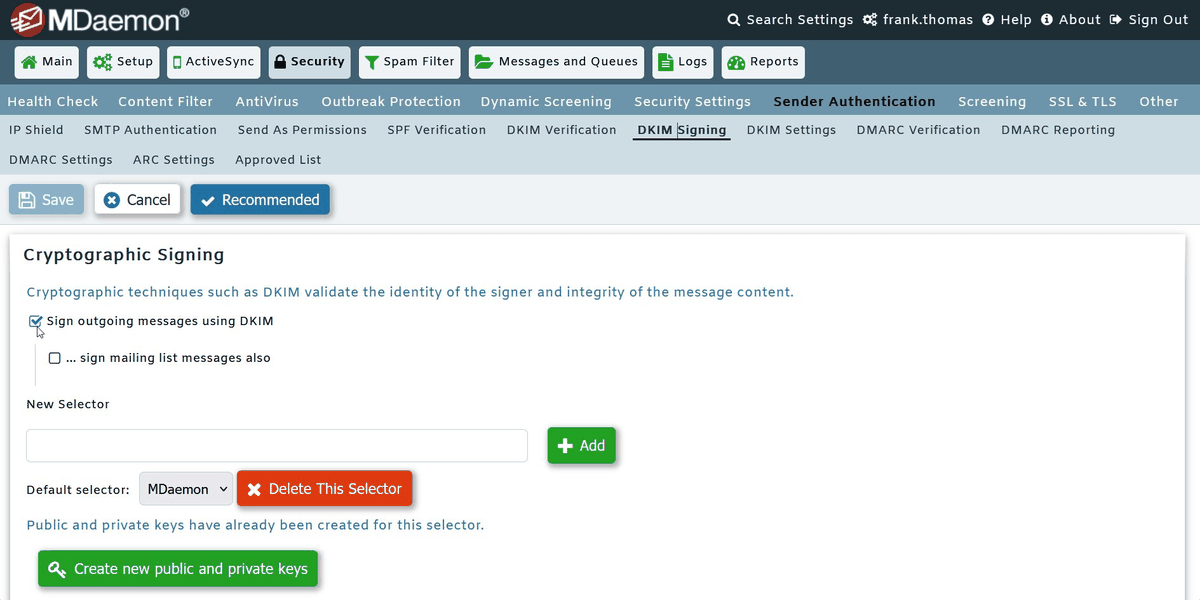
- Publish the DKIM public key at
<selector>._domainkey.yourdomain.comin DNS. Wait for propagation, then send yourself a test message and confirm the DKIM signature passes. - Publish or update your SPF record to include every legitimate sender. Test it with an SPF validator that explicitly counts DNS lookups.
- Publish your initial DMARC record with
p=none; rua=mailto:dmarc-reports@yourdomain.com(or your chosen reporting address). Confirm reports are arriving. - Configure aggregate report viewing in whatever DMARC processing tool you’ve chosen. Spend at least two weeks watching the reports before making your first policy change.
- Begin the phased rollout. Each step is a single DNS edit to your DMARC TXT record. Document the change date in your team’s notes so you can correlate any user-reported delivery issue with the policy step.
When you arrive at p=reject; pct=100
You’ve meaningfully reduced direct-domain spoofing of your domain. Mail with a From: of @yourcompany.com from a sender that isn’t on your authorized list will be rejected or quarantined by every receiver that enforces DMARC — which includes Gmail, Microsoft 365, Yahoo, Apple, and the rest of the major providers. Your customers, partners, and employees will largely stop seeing phishing impersonating your brand from your actual domain. Display-name spoofing and lookalike domains are separate problems DMARC alone doesn't fully address, but the direct-domain attack surface is closed.
A few things to keep in mind going forward:
- Keep aggregate reports flowing. New sending sources get added all the time. The reports are your early warning system.
- Add new senders to SPF and DKIM before turning them on. This is now an operational habit, not a one-time project.
- Consider BIMI as a next step. Brand Indicators for Message Identification require
p=quarantineorp=rejectto even be eligible. If you’ve made it this far, BIMI lets you display your logo next to authenticated mail in supporting inboxes — a brand and trust win you couldn’t have claimed atp=none.
While the process isn’t glamorous, these email security best practices will help you protect your domain's reputation. After all, phishing that never happens never makes the news.