Email is still the backbone of business communication, which means an email outage is rarely a minor inconvenience. When your mail server goes offline, orders stall, customers wait, and internal work grinds to a halt. That’s why failover and high availability (HA) should be considered with any MDaemon deployment plan.
The good news: achieving high availability with MDaemon is far simpler today than it used to be. This guide walks through your options, explains how to choose the right one, and covers the planning and testing that separates a resilient setup from one that only looks redundant.
What’s changed since this guide was first published
When we originally wrote about MDaemon failover, the recommended approach relied on stitching together Windows tools: Network Load Balancing (NLB) for traffic distribution and Distributed File System Replication (DFS-R) to keep two servers in sync, all with the MDaemon service set to start manually. It worked, but it was fragile, hard to maintain, and easy to misconfigure.
That method is now obsolete. Since MDaemon 20, the server has included a native Cluster Service that handles configuration sharing and node replication for you. Combined with MDaemon’s current licensing options for redundant and backup servers, you no longer need to hand-build HA out of operating-system parts. If you’re following an older NLB/DFS-R walkthrough, it’s time to retire it.
Choosing your high-availability approach
There’s no single “HA switch.” The right design depends on how much downtime you can tolerate, your budget, and whether you also want to spread load across servers. Here are the main building blocks, from baseline to fully redundant.
Reliable backups and a disaster-recovery plan. This should be the basic requirement. Regular, tested backups of your full MDaemon directory structure let you rebuild quickly on new hardware. Backups protect your data, but on their own they don’t keep mail flowing during an outage, since restoring takes time. Treat this as the safety net beneath everything else, not as your HA strategy.
A backup (secondary) MX for inbound resilience. Publishing a secondary MX record gives sending servers somewhere to queue mail if your primary is briefly unreachable. It’s inexpensive insurance against lost inbound messages during short interruptions, but it doesn’t keep webmail, IMAP, or outbound services available to your users. Think of it as one layer, not a complete solution.
Native MDaemon clustering (recommended). MDaemon’s Cluster Service is the modern path to real high availability. You designate one server as the primary node and one or more secondary nodes; the primary’s configuration is replicated to the others automatically. You can run the cluster in two ways:
- Active/passive: a standby node waits to take over if the primary fails. This is the classic failover model.
- Active/active: multiple nodes handle mail simultaneously, so you get load balancing and redundancy at the same time.
- One server is the primary node and is the only place you make configuration changes. Edits made on a secondary node are overwritten by the primary, and most of the secondary’s interface is intentionally disabled to prevent drift.
- The primary node’s settings are replicated to every secondary node, so a standby is always ready to serve with the same configuration.
- Clustering handles configuration and coordination. Directing users and inbound mail to a healthy node is still the job of a load balancer or failover mechanism sitting in front of the cluster, so plan for that component as part of your design.
- A current, supported MDaemon version on every node. The latest release is MDaemon 26.0 (2026). Clustering requires version 20.0 or later; run the same version on all nodes. Note that support for the 21.x line ended in March 2026, and 32-bit builds are no longer supported (22.0 and later are 64-bit only), so older installs should be upgraded first.
- A supported Windows operating system. MDaemon runs on Windows Server 2016, 2019, 2022, and 2025 (and comparable desktop editions). Match the OS and patch level across nodes where practical.
- Matched configuration and storage planning. All nodes should be sized consistently, and you’ll need to decide how mailbox data is shared or replicated between them.
- Appropriate licensing. Each MDaemon server requires its own license.
- A load balancer or failover front end, plus DNS/MX records that point to it.
- DNS and MX records. Point clients and inbound mail at your load balancer or failover address, not directly at a single server’s IP. Keep TTLs sensible so changes propagate quickly during an incident.[BW1]
- TLS certificates. Ensure valid certificates are present and consistent across nodes so encrypted connections don’t break on failover. MDaemon’s built-in Let’s Encrypt support can help automate this.
- Mail store strategy. Decide up front whether nodes use shared storage or replicated stores, and understand the trade-offs for consistency and recovery.
- Failback caution. When you move service from a standby back to the primary, reconcile any mailbox changes that occurred while users were on the backup; otherwise messages received or actions taken during the outage can be lost.
- Monitoring and alerting. Monitor node health, replication, and the load balancer, and alert on failover events so you know when a node has dropped.
Because configuration replication is built in, there’s no external sync tooling to babysit. You pair the cluster with a load balancer (hardware or software) or a DNS/failover mechanism to direct clients to a healthy node.
For a full overview of what clustering is and why it helps, see our companion post on improving email performance and uptime with MDaemon clustering, which includes a walkthrough video and a downloadable how-to guide.
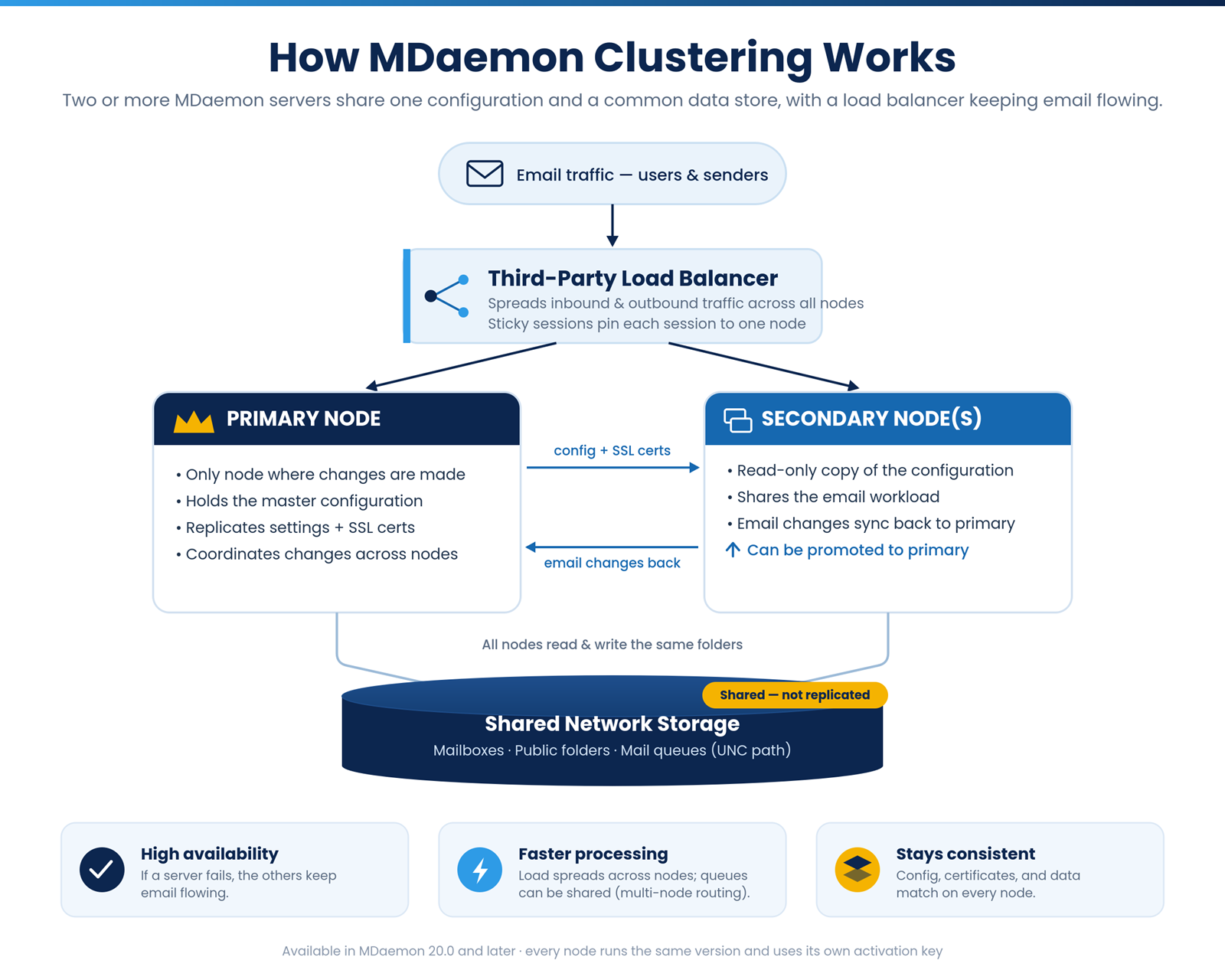
How MDaemon clustering works, in brief
At a high level, a cluster keeps two or more MDaemon servers in agreement about their configuration:
MDaemon’s documentation and the how-to guide linked above cover the exact, current step-by-step for setting up and joining nodes. Because those steps evolve between releases, follow the official guide for your installed version rather than any older third-party walkthrough.
Requirements and prerequisites for 2026
Before you start, make sure your environment meets these baseline requirements:
Planning and best practices
A cluster is only as reliable as the details around it. Keep these in mind:
Test your failover before you rely on it
The most common high-availability mistake is assuming it works. Schedule a controlled test: take the primary node offline during a maintenance window, confirm that mail continues to flow and users stay connected, then fail back and verify data consistency. Document the results and repeat the test periodically and after major upgrades.
Bringing it together
High availability for MDaemon comes down to a few clear choices: keep tested backups as your baseline, add a backup MX for inbound resilience, and build real continuity on MDaemon’s native Cluster Service in either an active/passive or active/active configuration, sized and licensed for a redundant node, fronted by a load balancer, and validated with regular failover testing.
Ready to build it? Start with our MDaemon clustering guide and video for the hands-on setup, and reach out to MDaemon support or your reseller to confirm the licensing that fits your topology.