If you run your own mail server or manage email for clients, Spamhaus probably has more influence over your deliverability than you'd like. Spamhaus says its data protects 4.5 billion user mailboxes, so a listing can quickly turn into bounced mail and frustrated users.
In October 2026, Spamhaus published its Sender Guidelines, a single reference for what it expects from anyone sending email. It also announced a change that SMB administrators and MSPs should act on now: starting in November 2026, Spamhaus is gradually rolling out a requirement for every sending IP to have a valid HELO, a reverse DNS (PTR) record, and a matching A record.
In this post, I’ll summarize what the guidelines cover, what's actually new, and what to check on your own infrastructure. For complete details, examples, and Spamhaus' own "how to check" instructions, read the full Spamhaus Sender Guidelines.
What Changed (and What Didn't)
Spamhaus says plainly that most of this is not new. In its announcement, Spamhaus wrote that its guidance "has always been available, but it's been spread across FAQs, best practice blogs, and support tickets." The new guidelines collect it in one place. Spamhaus also says the guidelines "aren't new rules"; they reflect RFCs, mailbox provider best practices, and what responsible senders already do.
The real change is enforcement of basic DNS hygiene. According to Spamhaus, "Starting in November 2026, we're gradually rolling out enforcement of basic DNS requirements over several months." Spamhaus has not published an end date or specific phases, so plan as if the requirement could apply to your IPs at any point.
Spamhaus' reasoning: DNS is "the other most common reason for listings," usually "because of an invalid HELO, no reverse DNS (PTR) record, or no matching A record." They also state, "a poorly configured server can easily be mistaken for a compromised one or a spammer."
The guidelines are written for "anyone who runs a mail server, from IT admins and small businesses managing their own set up to large senders and Email Service Providers (ESPs)." A separate page covers ESPs and large senders.
The Five Minimum Requirements
Spamhaus lists five minimum requirements that "all senders must meet... to avoid being listed":
- Use confirmed opt-in (COI) for everyone on your mailing lists. This applies to the people who subscribe to your organization's email, such as newsletters, product announcements, or marketing messages, not to a Spamhaus service. With confirmed opt-in, when someone signs up, you send them a confirmation email containing a link, and you add them to your list only after they click it. If they never confirm, don't send to them. This verifies that the address is real and that its owner actually asked for your mail.
- Publish forward-confirmed reverse DNS (FCrDNS) for every sending IP. The PTR record must point to a fully qualified domain name (FQDN), and that hostname must resolve back to the same IP.
- Use a HELO/EHLO hostname that resolves to the sending IP. It must also stay consistent across connections from that IP.
- Meet the IPv6 allocation and reverse DNS minimum. If you send over IPv6, the address must sit in a /64 or larger allocation with valid reverse DNS.
- Authenticate mail with SPF, DKIM, and DMARC. Publish SPF and DMARC for every sending domain, DKIM-sign every outbound message, and align the DKIM signing domain with the visible From domain.
Infrastructure and DNS: Where Self-Hosted Servers Get Caught
This section is the most important one for anyone running an on-premises mail server or email gateway. Spamhaus warns that failing these configuration items "can result in IPs being listed on the Email Spam IPs (CSS) or compromised IPs (XBL) zones."
Reverse DNS (PTR)
- Required: every sending IP needs a PTR record that resolves to an FQDN, and that hostname needs a forward A (or AAAA) record pointing back to the same IP.
- Recommended: use branded reverse DNS on your own domain rather than your provider's.
- Avoid: generic, auto-generated hostnames such as static-203-0-113-25.hosting.example.net on dedicated IPs.
PTR records are usually controlled by whoever owns the IP block (your ISP, hosting provider, or data center), not by your normal DNS zone. If your PTR is wrong, you will typically need to ask your provider to change it.
HELO/EHLO
- Required: the HELO hostname must resolve to the sending IP and stay consistent. Spamhaus notes that "multiple HELO values resolving to different IP addresses may indicate residential proxy and/or malware behavior."
- Recommended: where possible, use the same hostname for HELO and PTR, and host a simple web page on the HELO domain explaining what it is (or redirecting to your main site).
- Avoid: localhost, hosting-provider defaults, HELO names that resolve to non-sending infrastructure, and anything that impersonates a large mailbox provider.
In practice, a correctly aligned server has three pieces that all agree: the hostname the server announces in HELO/EHLO, the A record for that hostname, and the PTR record for the sending IP. Here is what each one looks like for a server named mail.example.com sending from the IP address 203.0.113.25.
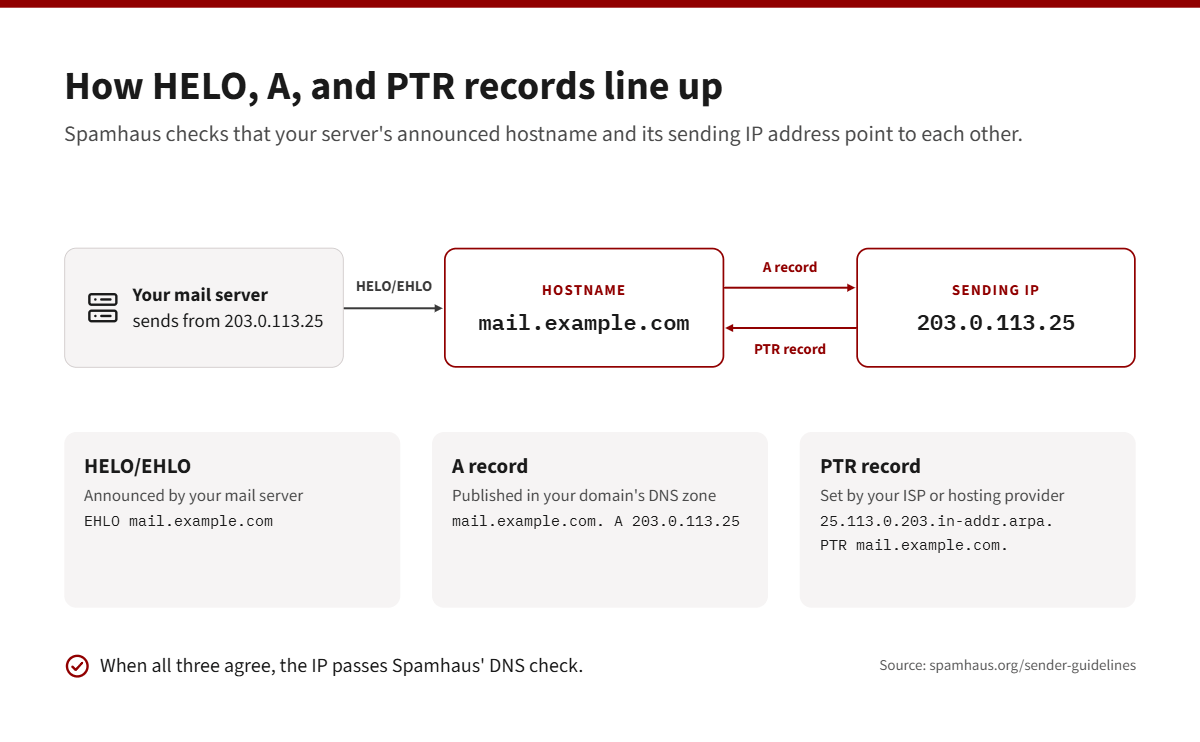
HELO/EHLO (the hostname your mail server announces when it connects to a receiving server):
EHLO mail.example.com
A record (published in your domain's DNS zone, pointing the hostname to the sending IP):
mail.example.com. IN A 203.0.113.25
PTR record (set by your ISP or hosting provider, pointing the IP back to the hostname):
25.113.0.203.in-addr.arpa. IN PTR mail.example.com.
You can confirm both lookups from a command prompt. Looking up the hostname should return the sending IP, and looking up the IP should return the hostname:
nslookup mail.example.com (should return 203.0.113.25)
nslookup 203.0.113.25 (should return mail.example.com)
By contrast, each of these common setups would fail Spamhaus' checks:
- The server announces EHLO SERVER01 or EHLO localhost. Neither is a fully qualified domain name that resolves to the sending IP.
- The sending IP has no PTR record at all, which is common when a mail server is moved to a new IP or hosting provider.
- The PTR record points to mail.example.com, but the A record for mail.example.com points to a different IP (for example, an old server that has since been retired).
Envelope From (MAIL FROM)
- Make sure SPF is correct for the envelope sender domain.
- Use Sender Rewriting Scheme (SRS) when forwarding mail.
- Don't use freemail domains such as gmail.com as the envelope sender.
- Reject unwanted mail during the SMTP session instead of accepting it and bouncing it later. Spamhaus warns that backscatter "can severely harm reputation."
DNS Hygiene
Audit DNS regularly. Remove CNAMEs, NS delegations, A records, and SPF include: entries for services you no longer use. Spamhaus warns that dangling records "can be claimed by others and used to send mail that appears to come from the domain." It also advises against wildcard DNS records.
Authentication: SPF, DKIM, and DMARC
SPF
- Publish an SPF record that names exactly which IPs and hosts may send, and make sure every sending IP is included.
- Both the HELO domain and the envelope From domain need valid SPF records.
- Stay within the 10 DNS lookup limit, including nested include: statements. Going over the limit returns a PermError, which "is not a pass."
- Avoid +all and overly broad includes. Prefer ip4:/ip6: over a or mx mechanisms, because those count against the lookup limit.
DKIM
- Sign every outbound message with at least a 1024-bit key; 2048-bit is recommended.
- The d= domain must match the header From domain.
- Recommended: rotate keys at least once a year, and use different d= domains (for example, separate subdomains) for transactional and marketing mail.
DMARC
- Publish a DMARC record with a defined policy, and make sure the From domain aligns with the DKIM signing domain.
- Set up an aggregate report address (rua=) "from day one."
- Don't stay at p=none forever. Spamhaus says starting there is acceptable but recommends moving to an enforcement policy such as p=reject. We discuss how to do this in our post: How to Move Your DMARC Policy from p=none to p=reject Without Breaking Mail.
Permission and List Hygiene
Spamhaus is direct about this: lack of permission is "one of the most common reasons for being listed." The guidelines require confirmed opt-in for bulk email, prohibit purchased, rented, or harvested lists, and state that permission "is NOT transferable."
Spamhaus also recommends the following:
- Keeping timestamped records of when and how permission was obtained.
- Using a sunset policy to remove addresses that no longer engage. Citing M3AAWG, Spamhaus notes that mailboxes inactive for more than 12 months can be repurposed as spam traps.
- Not trying to identify or suppress individual spam trap addresses. Instead, find and remove the list source that introduced them.
Sending Best Practices
Warm-Up
- HELO domains with no sending history will face additional filtering.
- Treat any IP or domain that hasn't sent in the past 90 days as new, and ramp volume slowly.
- Domains registered in the past 24 hours appear on Spamhaus' Zero Reputation Domains (ZRD) list. Domains used for mail within 30 days of registration are treated with suspicion.
- Changing your IP or HELO hostname without prior sending history means warming up again.
- Don't use engagement-inflation "warm-up services." Spamhaus says doing so "will result in the IP or domain being listed."
Bounces
- Keep your overall bounce rate below 5% (this is a requirement).
- Suppress hard bounces immediately, and remove addresses after repeated soft bounces (typically 3 to 5 consecutive).
Unsubscribe
- Bulk commercial senders must support one-click unsubscribe using the List-Unsubscribe-Post: List-Unsubscribe=One-Click header (RFC 8058).
- Every commercial email needs a visible unsubscribe link in the body.
- Process unsubscribe requests within 2 days.
Content
Use HTTPS links, avoid free or unbranded URL shorteners, and sign or validate tracking links so they can't be abused as open redirects.
IP and Domain Reputation
Spamhaus recommends checking your IP and domain reputation regularly with its Reputation Checker rather than waiting for a delivery problem. Reputation depends on your hosting provider, IP neighborhood, upstream networks, registrar, and history. Spamhaus also advises against cousin domains (use subdomains instead) and against hiding WHOIS details on your root sending domain.
For MSPs and Larger Senders
If you relay mail for multiple clients, read the separate ESP and Large Sender guidelines. Notable points include the following:
- Brand reverse DNS and HELO with the customer's domain where possible, and make sure "the HELO, PTR and A record all use the same hostname."
- Keep a monitored, unfiltered abuse address.
- Separate transactional and marketing traffic by IP.
- Watch for volume spikes, bounce rates above 5%, and complaint rates above 0.3% at the customer account level, and throttle or review accounts that exceed them.
- Require SPF, DKIM, and DMARC before customers can send.
How This Compares to Google, Yahoo, and Microsoft
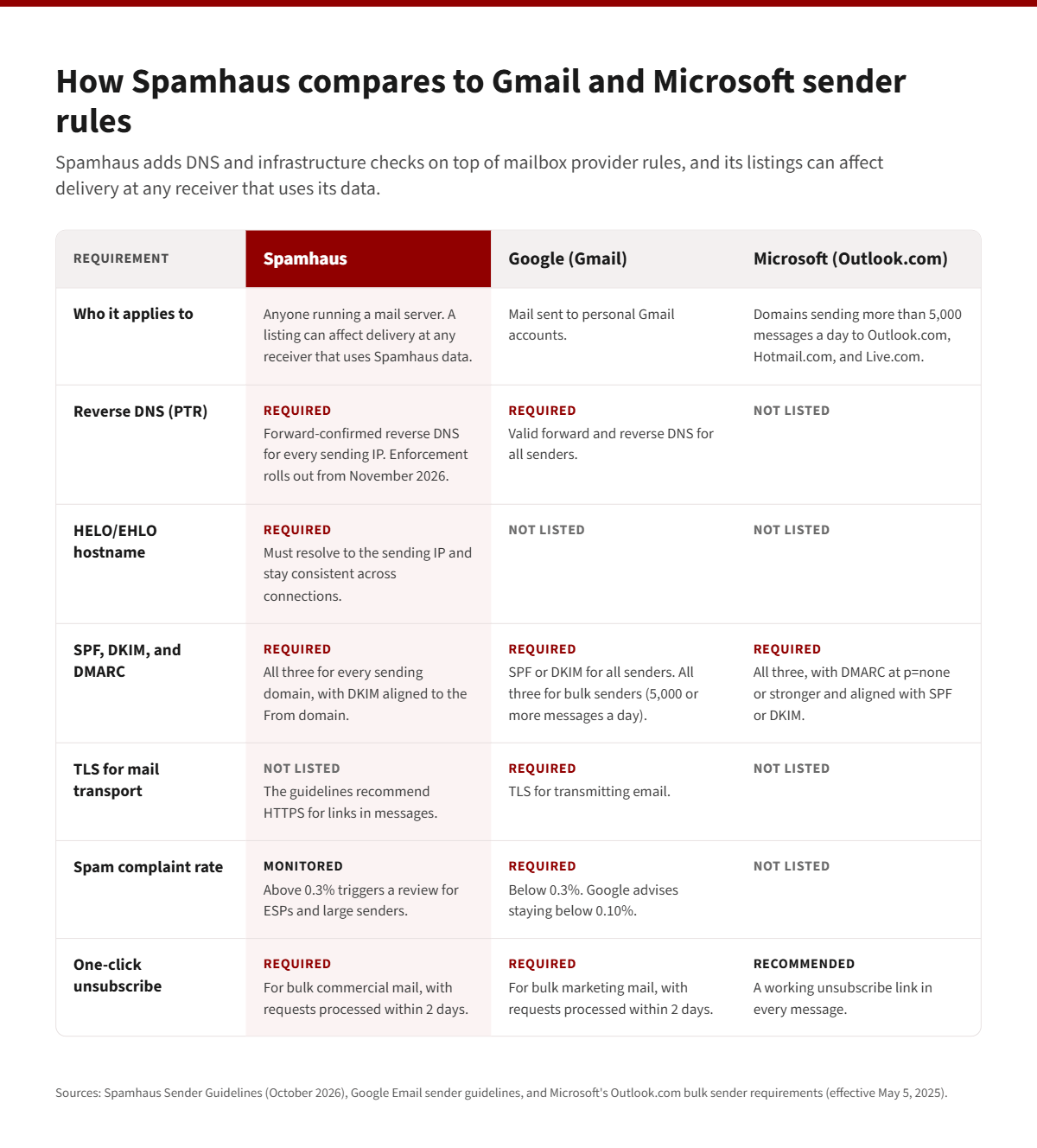
None of this will surprise administrators who have kept up with mailbox provider requirements. Google's Gmail sender guidelines (more info here) already require all senders to have valid forward and reverse DNS, use TLS, and keep spam rates below 0.3% (Google advises staying below 0.10%), and they require bulk senders (5,000 or more messages a day) to also use SPF, DKIM, and DMARC. Since May 5, 2025, Microsoft has required SPF, DKIM, and DMARC (at least p=none, aligned with SPF or DKIM) for domains sending more than 5,000 messages a day to Outlook.com, Hotmail.com, and Live.com addresses.
Spamhaus says its guidelines are "aligned with existing guidance from mailbox providers, with additional emphasis on DNS and infrastructure." The difference is scope. Gmail's and Microsoft's rules govern delivery to their own mailboxes. A Spamhaus listing can affect delivery at any receiver that uses Spamhaus data. Note that the Spamhaus guidelines do not include an SMTP TLS requirement for transport, but TLS is still required by Gmail and is good practice anyway.
What to Check This Week
- Run the Spamhaus HELO/DNS checker on the Sender Guidelines page for every outbound IP. You can also send a message to helocheck@abuseat.org to see the HELO your server actually presents.
- Fix HELO/PTR/A alignment. Set the server's HELO to an FQDN on your own domain, make sure that name has an A (or AAAA) record pointing to the sending IP, and ask your ISP or host to set the PTR to the same name.
- Find every device that sends on port 25. Spamhaus looks for inconsistent HELO values from the same IP, so a printer, scanner, or forgotten app sending directly through your public IP can cause trouble.
- Audit SPF. Count DNS lookups, remove old vendors, and confirm every sending IP is listed.
- Confirm DKIM signing on all outbound mail with a 2048-bit key where supported, aligned with your From domain.
- Publish DMARC with `rua=` reporting, review the reports, and plan your move from p=none to enforcement.
- Review list practices. Confirm opt-in, check that bounces are suppressed, and make sure unsubscribes are honored within 2 days.
- Check your reputation with the Spamhaus Reputation Checker.
A Note for MDaemon and SecurityGateway Administrators
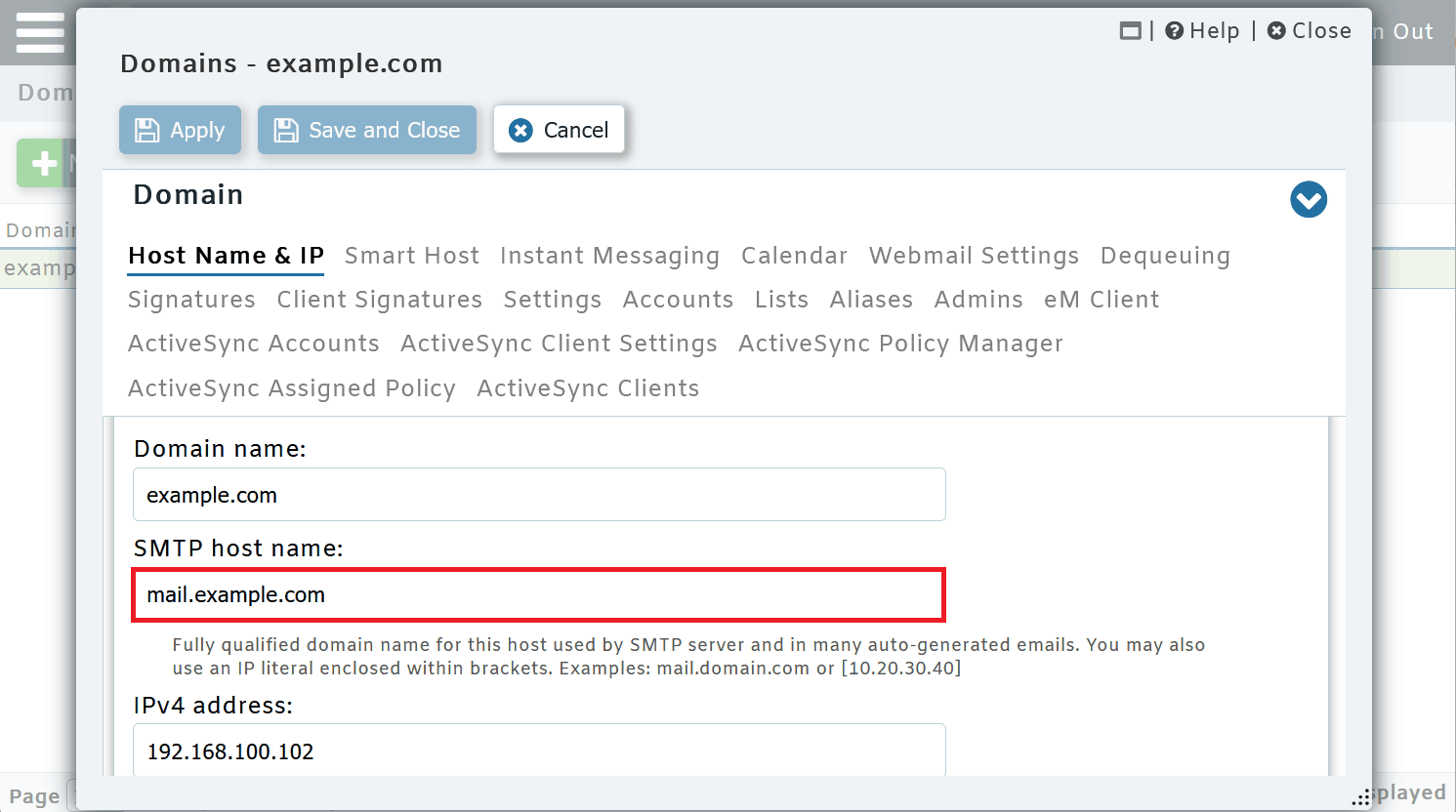
If you run your own server, most of these items come down to a few settings plus DNS records you publish. In MDaemon Email Server, the FQDN used in the SMTP HELO/EHLO for each domain is set in the SMTP host name field, which can be found under the Domain Manager's Host Name & IP screen. DKIM signing options are located under Security > Security Settings > Sender Authentication.
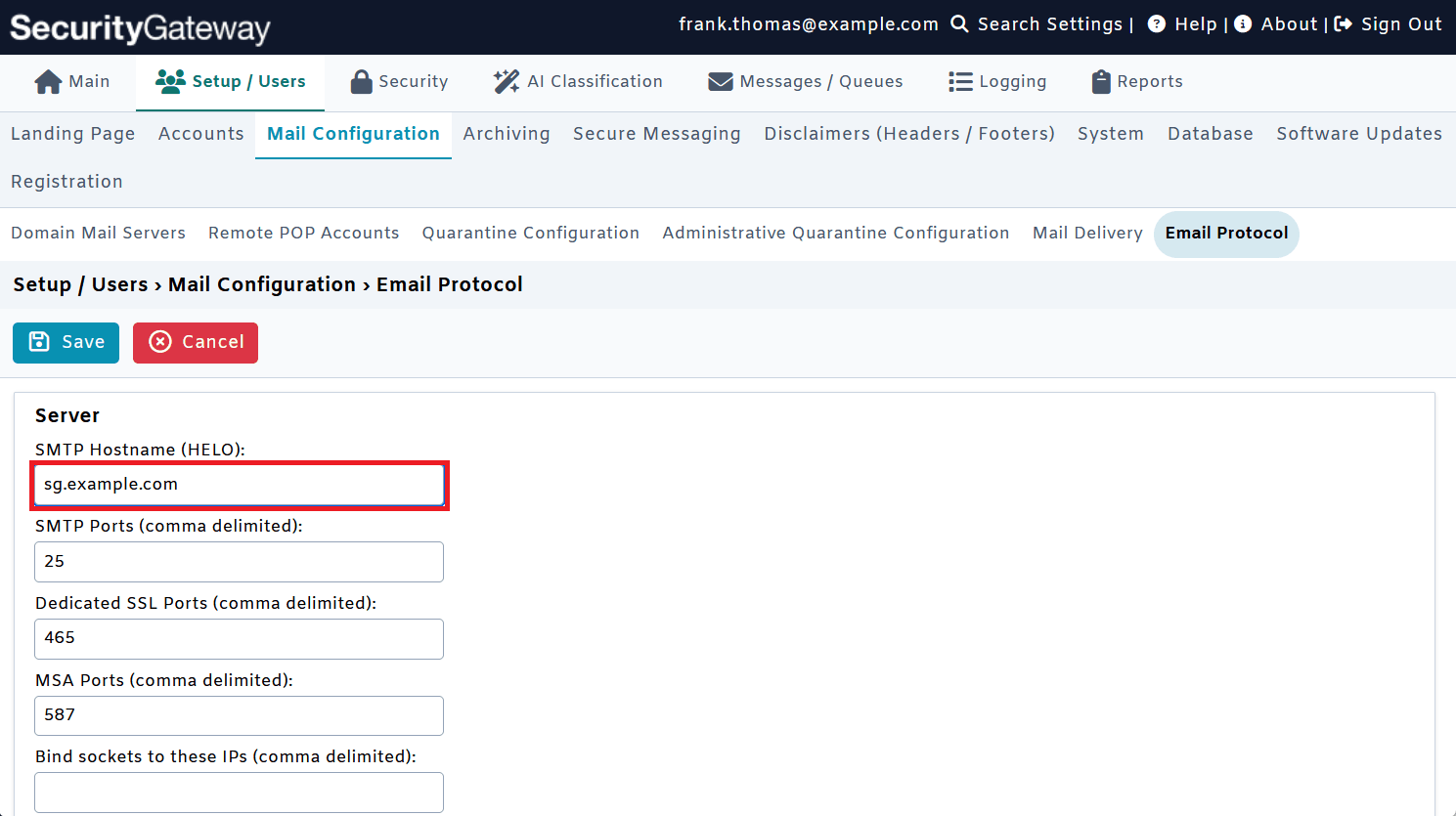
In SecurityGateway for Email, the HELO Domain Name setting is located on the Email Protocol page. Whatever platform you use, the HELO value only meets Spamhaus' requirement if public DNS (A and PTR records) matches it, so coordinate with your DNS host and IP provider as well.
The Bottom Line
The Spamhaus Sender Guidelines mostly put long-standing best practices in writing. The November 2026 rollout gives those practices a practical deadline. If every sending IP you manage has a consistent HELO, a matching PTR, and a forward record that points back to it, and your domains are authenticated and your lists are permission-based, you're in good shape. If not, now is the time to fix it, before a listing does the reminding for you.
For the full requirements, recommendations, and step-by-step "how to check" instructions, visit the Spamhaus Sender Guidelines.