Black Friday is almost here, and Cyber Monday is right around the corner, on November 30. This week your users will be shopping, tracking packages, and reading promotional email, and much of that happens on work devices and company email accounts. Attackers plan around this. A fake order confirmation or delivery notice is easy to miss in a week when real ones arrive by the dozen.
The risk is not limited to a user's personal credit card. A stolen password can be reused against your mail server, a malicious attachment can land on a company laptop, and a compromised mailbox can send spam to your customers over the long weekend while much of your IT staff is on vacation.
Below is a quick look at what this year's phishing attacks look like, followed by two short checklists: one to share with your users, and one for the administrators who manage MDaemon Email Server and SecurityGateway for Email.
What This Year's Attacks Look Like
Three security research teams published Black Friday research in the past two weeks, and all of them report the same trend: shopping-themed phishing started early and is climbing fast.
One threat lab reports that the first week of November saw 82% more Black Friday phishing than all of October. It detected the first Black Friday campaign on October 20, and manufacturing, healthcare, and government organizations were among the most targeted.1
Another research team found more than 4,000 new sales-related domains registered between October 1 and November 8, and nearly one in five was already classified as risky. It also counted 647 new lookalike domains using the FedEx name since September.2
A third team reports that half of the Black Friday-themed email campaigns it observed from October 30 to November 10 were scams, and the United States received 46% of them.3
These figures come from each research team's own sources, so treat them as a trend rather than an industry-wide count. The lures themselves are consistent across all three reports:
- Fake delivery notices. Messages impersonating FedEx, UPS, DHL, or USPS claim a package is delayed and ask the recipient to update an address or pay a small redelivery fee.
- Account and order alerts. Messages warn of an unauthorized charge or a suspended account and ask the recipient to sign in again to "verify" it.
- Deals that are too good to be true. Discounted electronics, luxury goods, and "early access" offers link to fake storefronts that collect credit card numbers and personal details.
- Gift cards, giveaways, and prizes. Messages promise a reward for a limited time in exchange for a sign-up or a small payment.
How Holiday Scams Have Grown
Holiday shopping scams are not new, but they have become more common, more costly, and easier for criminals to run at scale.
Losses keep climbing. During the 2022 holiday shopping season, the FBI Internet Crime Complaint Center (IC3) received reports from almost 12,000 victims, with losses of more than $73 million.4 The following season, IC3 received more than 13,000 complaints about goods that were paid for but never delivered, with $92 million in reported losses.5 Across all of 2025, IC3 received more than 1 million complaints totaling $20.877 billion in losses, a 26% increase over 2024.6 Non-payment and non-delivery schemes alone accounted for $503 million of those losses.7 Phishing and spoofing was the most frequently reported crime type, with nearly 192,000 complaints.8
Attacks have spread beyond the inbox. Fake delivery notices now arrive by text message as often as by email. The Federal Trade Commission reports that consumers lost $470 million to scams that started with a text message in 2024, more than five times the 2020 total, and fake package delivery problems were the most reported text scam.9
Phishing is now sold as a service. Criminals no longer need technical skills to launch a convincing campaign. A federal lawsuit filed in November 2025 describes a phishing kit that sells hundreds of ready-made fake website templates. According to the complaint, its users created or used 32,094 distinct websites that mimicked the U.S. Postal Service between July 2023 and October 2024, targeted victims in more than 120 countries, and could compromise between 12.7 million and 115 million U.S. credit cards.10
AI makes lures harder to spot. The 2025 IC3 report included AI-related scams for the first time, with reported losses of more than $893 million. Federal guidance warns that criminals use AI to impersonate legitimate vendors and charities and to run traditional scams faster and at greater scale, and that holiday stress and distractions make people easier to target.11
Who is most vulnerable? Anyone can be targeted, but the impact varies by age. Reported fraud losses for adults 60 and older rose roughly fivefold, from about $600 million in 2020 to about $3 billion in 2025. Older adults report losing money less often than younger adults, but they lose more when they do: the median reported loss for people 80 and older was $2,000. They are also more likely to lose money to tech support, prize and sweepstakes, romance, and government impersonation scams.12
Documented cases show the cost. In April 2026, four defendants were sentenced for a business email compromise scheme that stole more than $38 million from individuals and businesses in the U.S. and abroad. The group gained access to victims' email accounts, monitored conversations about legitimate transactions, and impersonated trusted business partners to redirect payments.13 Gift card fraud operates at a similar scale: federal prosecutors in New Hampshire reported that organized criminal groups acquired well over $100 million in gift cards through fraudulent means.14
Checklist for Users
Share this list with your staff before they leave for the holiday. Each item takes only a few seconds and stops the most common lures described above.
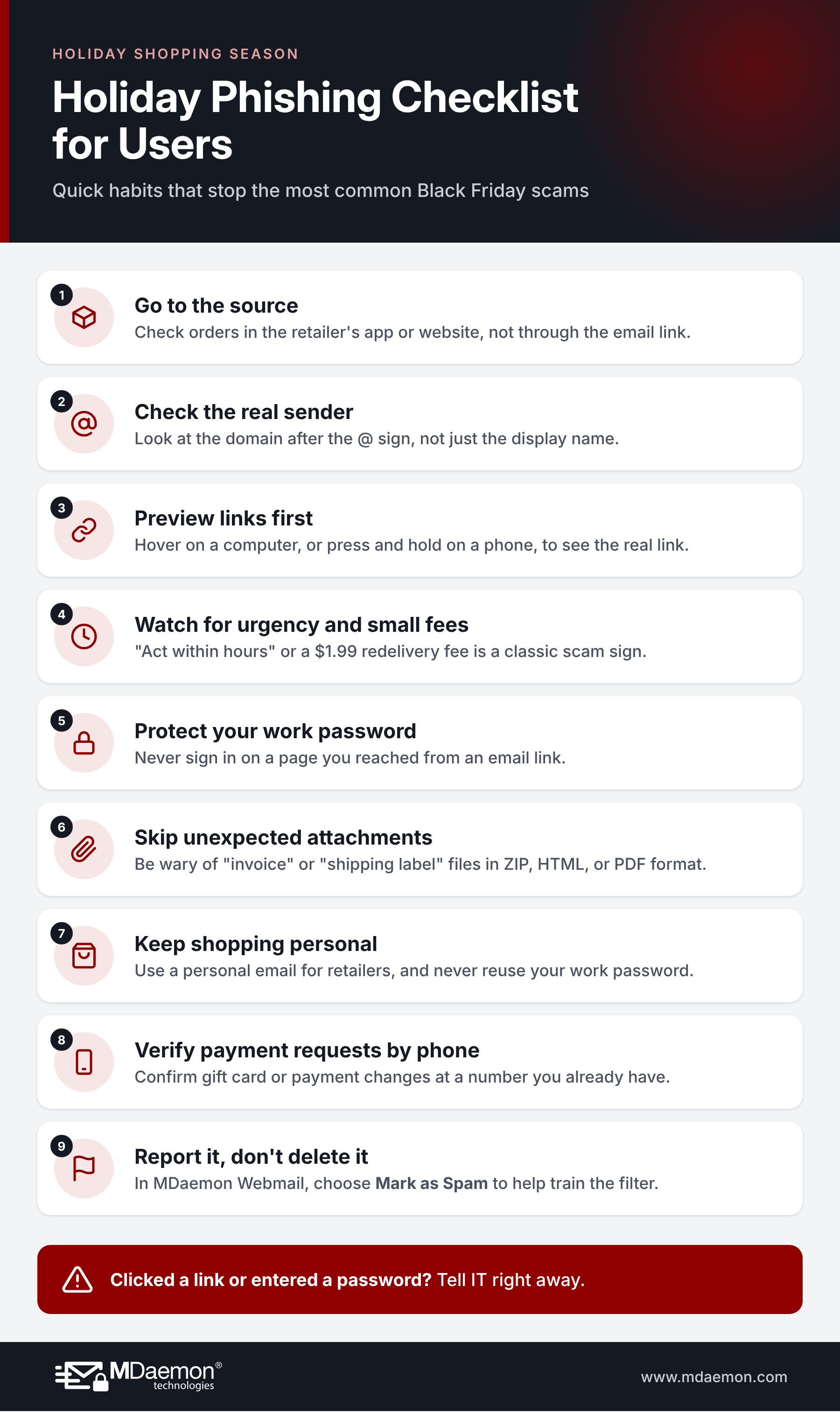
- Go to the source directly. If an email says a package is delayed or an order has a problem, open the retailer's or carrier's app, or type its web address yourself. Don't click the link in the message.
- Check the sender's address, not just the name. A display name like "FedEx Delivery" can be attached to any address. Look at the domain after the @ sign. If your administrator has turned on MDaemon's From Header Screening, the real address may also appear next to the sender's name.
- Preview links before you click. Hover over a link on a computer, or press and hold it on a phone, to see where it actually goes.
- Be suspicious of urgency and small fees. A message that demands action within hours, or asks for a $1.99 redelivery fee, is a classic sign of a scam.
- Never enter your work password on a page you reached from an email. If a shopping or delivery link opens a sign-in page, close it and go to the site directly.
- Don't open unexpected attachments. Be especially careful with "invoice," "receipt," or "shipping label" files in ZIP, HTML, or PDF format.
- Keep personal shopping separate from work. Use a personal email address for retailer accounts, and never reuse your work password on a shopping site.
- Verify gift card and payment requests by phone. If a manager or vendor asks you to buy gift cards or change payment details, call them at a number you already have.
- Report suspicious messages instead of deleting them. In MDaemon Webmail, open the message, click the three-dot menu, and choose Mark as Spam. This helps train the spam filter for everyone. If you clicked a link or entered a password, tell IT right away.
For more examples of seasonal scams and how to spot them, see Email Scams to Watch Out For During the Holiday Season.
Checklist for Administrators
Users are the last line of defense, and they may be more vulnerable during this holiday week. These settings reduce the likelihood of phishing messages reaching them and limit the damage if one gets through. Most can be reviewed in an afternoon.
- Install the latest critical updates. Critical Update MD11192026 affects MDaemon Email Server 22.0.0 through 26.5.0. MDaemon 26.5.1, released November 17, already includes the fixes, and free update builds are available for every supported branch. SecurityGateway customers should be on version 12.5.1 or later to address Critical Update SG090126.
- Turn on Hijack Detection. Compromised accounts often start sending spam over a holiday weekend when no one is watching. In MDaemon Remote Administration, Hijack Detection can be found under Security > Screening > Hijack Detection. Set a limit on how many messages an authenticated account can send within a set number of minutes, and enable the option to freeze the account when the limit is reached. The postmaster is notified by email when this happens. See the Hijack Detection KB article for details. SecurityGateway has the same protection under Account Hijack Detection.
- Block disguised and executable attachments. In SecurityGateway, Attachment Filtering is located under Security > Filtering > Attachment Filtering. No content-based file type categories are selected by default, so choose the categories you want to block or quarantine, such as executables and scripts. Because these rules match an attachment's detected content, a renamed file is still caught. SecurityGateway 12.5 also added Attachment Disguise Protection, which flags files whose real type doesn't match the extension, such as an executable renamed to .pdf. For a walkthrough, see How to Block Executable Files in SecurityGateway.
- Review your spam filter and DNS blocklists. In MDaemon, the spam filter settings can be found under Security > Spam Filter. By default, messages that score above 5.0 are marked as spam and messages above 12.0 are rejected. If you have a Spamhaus Data Query Service (DQS) key, confirm that it's entered. Our recommended security settings article will take you through each screen.
- Confirm that users can report spam from Webmail. The Spam and Not Spam options in Webmail rely on Public Folders and the Bayesian learning folders. If users don't see them, follow the steps in How to configure Webmail to give users the ability to mark messages as Spam or Not Spam.
- Make it harder to spoof your own domain. Fake invoices and payment requests often appear to come from inside your company. Publish SPF, DKIM, and DMARC records, and work toward an enforcing DMARC policy. Start with How to enable DMARC and configure records, then see How to Move Your DMARC Policy from p=none to p=reject Without Breaking Mail.
- Stop display name spoofing. Attackers often put a trusted name, or even a legitimate-looking address, in the display name while sending from an unrelated address. In MDaemon Remote Administration, From Header Screening can be found under Security > Screening > From Header Screening. Enable Replace mismatched email addresses in display-names with real ones so a fake address in the display name is replaced with the actual sending address, and consider Add email address to display-name so users see the real address next to every sender's name (more info here).
In SecurityGateway 12 and later, Display Name Protection is located under Security > Anti-Spoofing > Display Name Protection. Add protected users such as executives, finance, and HR staff, then choose whether to refuse, quarantine, or tag messages that use a protected user's name from a different address. You can also apply stricter handling to messages from free webmail providers (more info here). - Tag messages from external senders. A content filter rule that adds a warning to mail from outside your organization helps users catch impersonation attempts. Learn more here: How to Protect MDaemon Users from Phishing
- Encourage two-factor authentication. A stolen password is far less useful when the account also requires a code. Users can enable it in Webmail under Options > Security. HTTPS must be enabled for Webmail. See How to enable two-factor authentication.
- Decide who is watching over the long weekend. Confirm who receives postmaster and quarantine notifications, and make sure that person can reach the MDaemon and SecurityGateway admin consoles remotely if an account needs to be frozen.
Stay Alert Through Cyber Monday
Holiday phishing won't end on Friday. Cyber Monday deals, year-end invoices, and gift card requests will keep coming through December. Share the user checklist with your staff today, work through the admin checklist before the long weekend, and you'll start the holiday season with fewer surprises waiting in your users' inboxes.
If you'd like help reviewing your MDaemon or SecurityGateway configuration, contact our team.
Related reading
- Email Scams to Watch Out For During the Holiday Season
- Email Admin Tips: How to Protect MDaemon Users from Phishing
- How to Block Executable Files in SecurityGateway
- Best Practices to Avoid Business Email Compromise and CEO Fraud Attacks
- Why You Can't Rely on Users to Keep Email Secure
- Introducing SecurityGateway 12, with Display Name Protection
Sources
- KnowBe4, "KnowBe4 Warns Shoppers to Stay Alert as Black Friday Phishing Rises 82% in Early November," November 19, 2026. knowbe4.com
- Check Point Research, "Black Friday Cyber Crime 2026: Attacks on Retailers Surge 28% as Risky Domains Multiply," November 16, 2026. blog.checkpoint.com
- Bitdefender, "Black Friday Scam Report 2026," November 19, 2026. bitdefender.com
- FBI San Francisco, "FBI Warns the Public of Holiday Scam Trends," December 13, 2023. fbi.gov
- CBS News Miami, "Holiday season brings uptick in phone, internet scams," citing the FBI Miami Field Office. cbsnews.com
- U.S. Department of the Treasury, Office of Cybersecurity and Critical Infrastructure Protection, "2026 Seasonal Scam Advisory," citing the FBI IC3 2025 Annual Report. home.treasury.gov
- FBI Internet Crime Complaint Center (IC3), "Top 10 Crime Types by Loss in 2025," IC3 brochure. ic3.gov
- Fast Company, "The FBI just dropped its 2025 internet crime report. Here are 6 big takeaways," April 2026. fastcompany.com
- Federal Trade Commission, "New FTC Data Show Top Text Message Scams of 2024; Overall Losses to Text Scams Hit $470 Million," April 2025. ftc.gov
- NPR, "Google launches a lawsuit targeting text message scammers," November 12, 2025. npr.org
- U.S. Department of the Treasury, Office of Cybersecurity and Critical Infrastructure Protection, "2026 Seasonal Scam Advisory." home.treasury.gov
- Federal Trade Commission, "Protecting Older Consumers 2025-2026" report announcement, October 19, 2026. ftc.gov
- U.S. Attorney's Office, Southern District of Florida, "Transnational Email Fraud Scheme Nets Prison Terms for Four Defendants," April 30, 2026. justice.gov
- U.S. Attorney's Office, District of New Hampshire, "Chinese Nationals Sentenced to Federal Prison for Participating in Fraudulent Gift Card Conspiracy," April 2025. justice.gov